
#1 · 10/10/2026 04:54
❤ 0
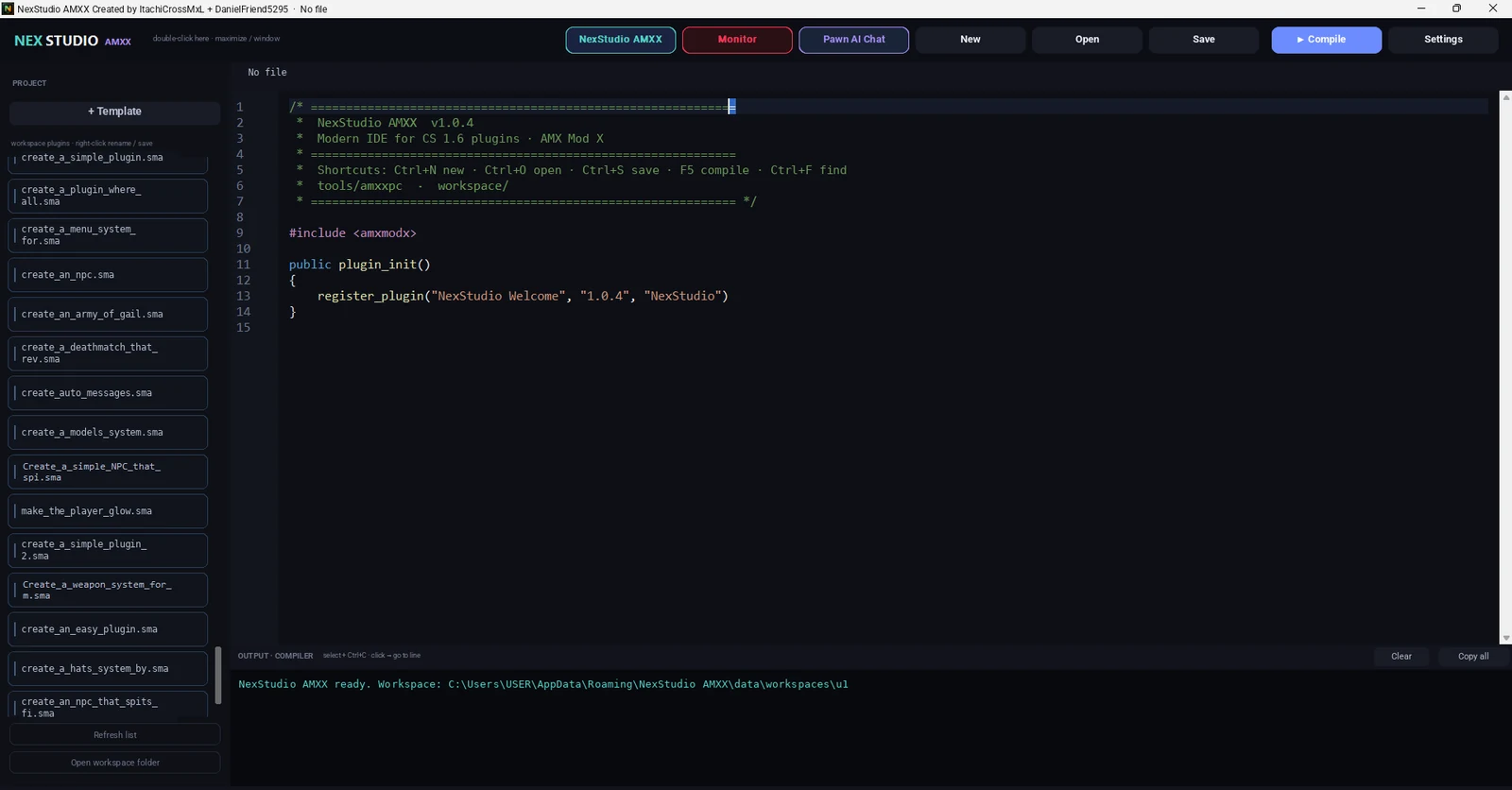
Hello community! 👋
NexStudio AMXX 1.0.4 is now available, the new version of our IDE to create Pawn / AMX Mod X plugins for Counter-Strike 1.6. This update brings three big new features: a Monitor CS 1.6 to test your plugin without leaving the IDE, a renewed Chat AI Pawn with several conversations and the Open Source mode to connect your own AI API.
Test, edit and generate without leaving the IDE.
🖥️ 1. CS Monitor 1.6
Test your .sma functions within the IDE and see if they work.
- Try your .sma directly in NexStudio.
- Edit HUD and live texts: change position and color, and save them back to the SMA.
- Preview of what menus and chat/center messages look like.
- Console Test Pawn and more.
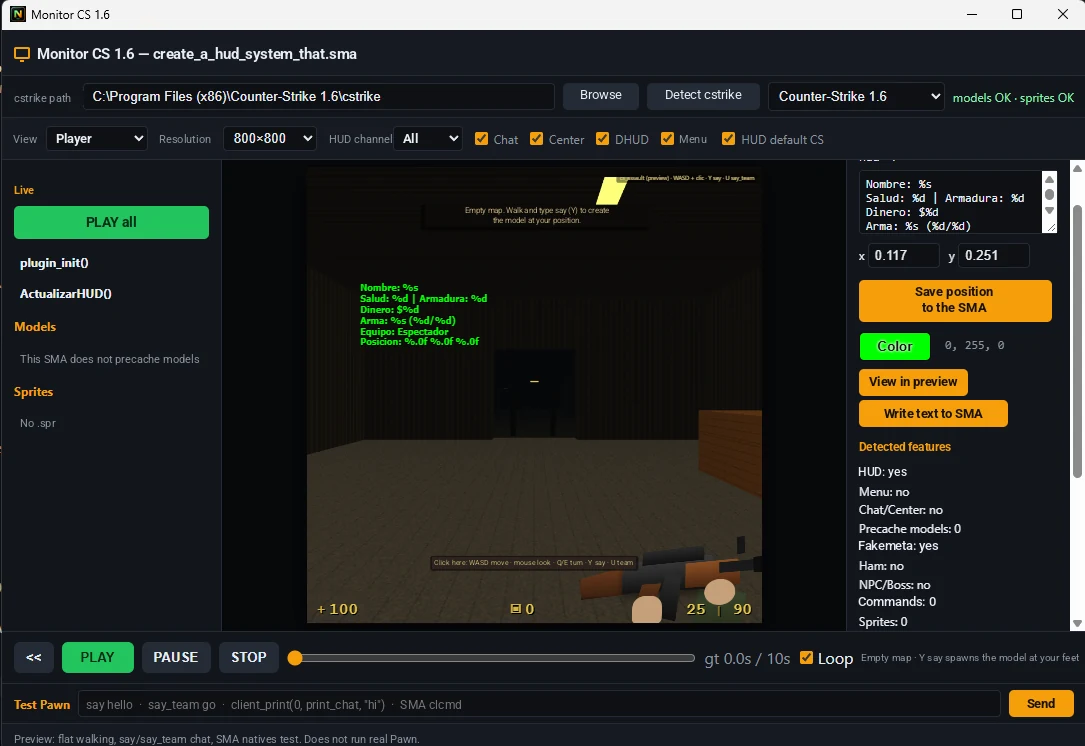
CS Monitor 1.6 with HUD Preview and Test Pawn Console.
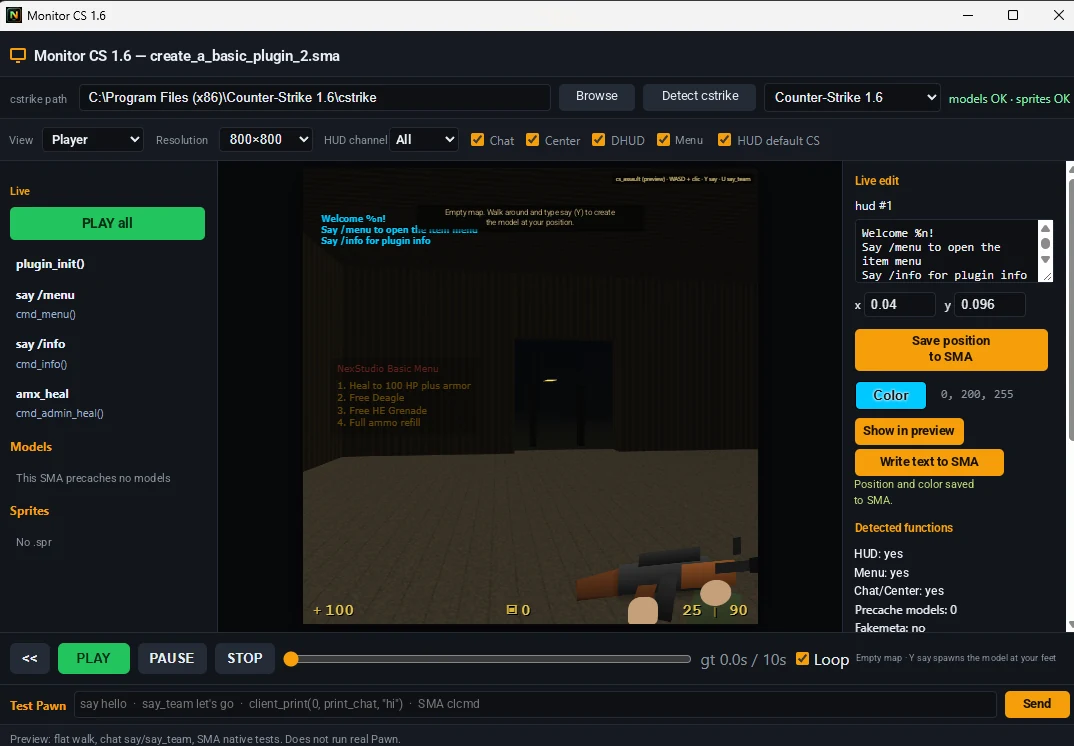
Weapon menu and HUD with live editing of position and color.
🤖 2. New AI Chat Pawn
Goodbye to "closed conversation": you now have several conversations saved.
- If you say "trust me" or ask for something new, a new chat opens only.
- If you say "improve" or "modify", it fixes in the same chat, on the same .sma.
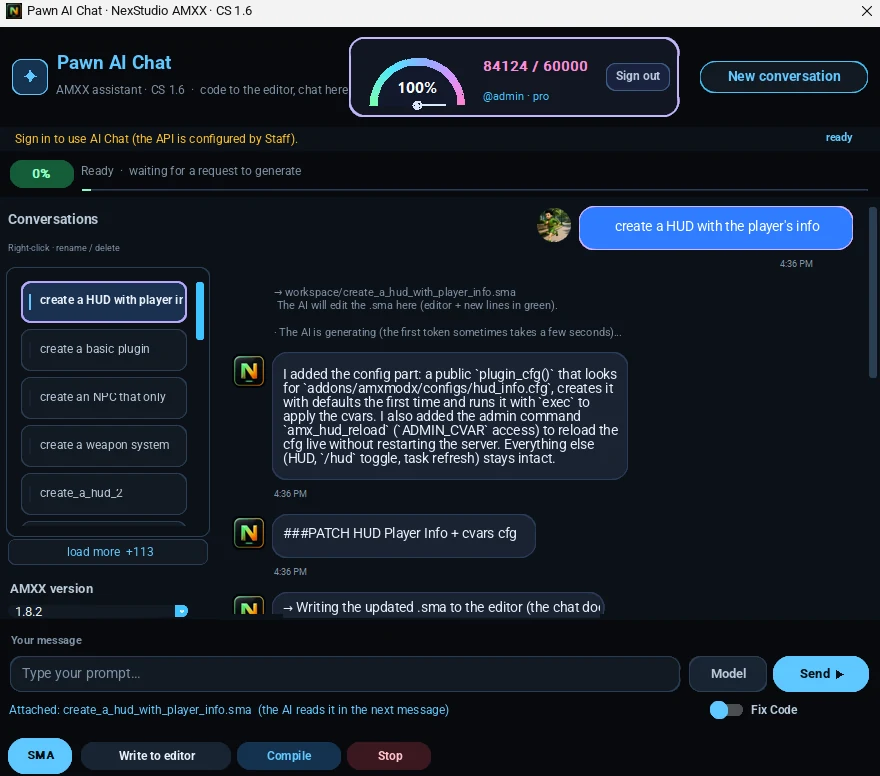
Chat AI Pawn creating a HUD with player information in a new conversation.
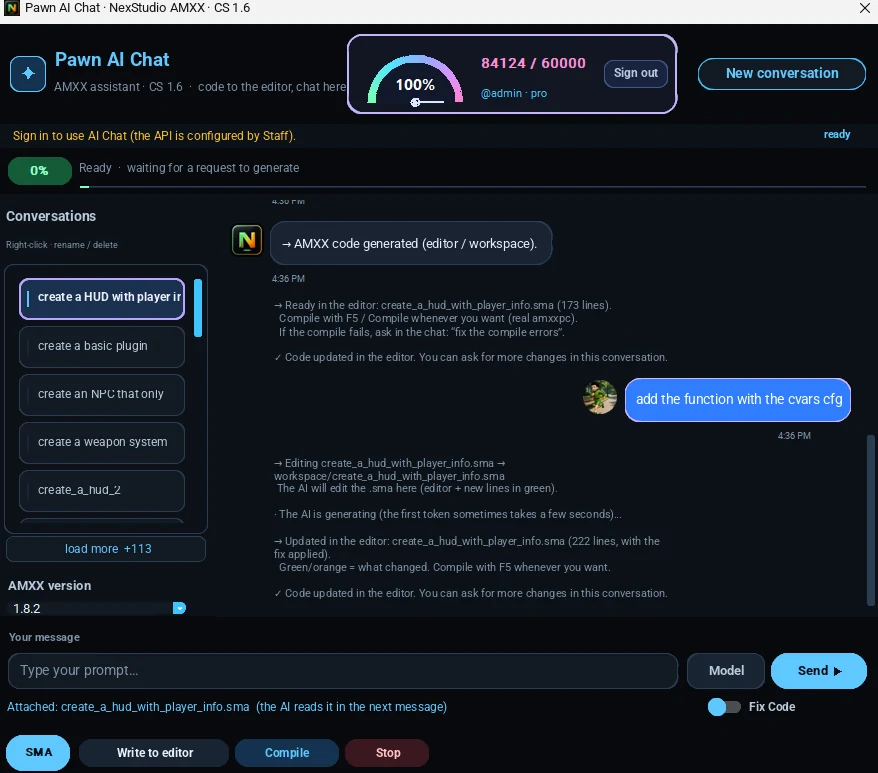
Chat IA Pawn modifying the same .sma in the same conversation.
🔓 3. Open source: bring your own AI
Plug in your own AI API and use it within NexStudio: Gemini, ChatGPT (OpenAI) or any OpenAI compatible API. You choose which AI writes and improves your plugins.
- Your own API key and your favorite model.
- You configure provider, API key, model and base URL (the base URL is only needed for APIs compatible with OpenAI).
- Same AI Pawn Chat flow: create, modify and build.
- With mode off, AI Chat uses the NexStudio API. You can come back to it whenever you want.
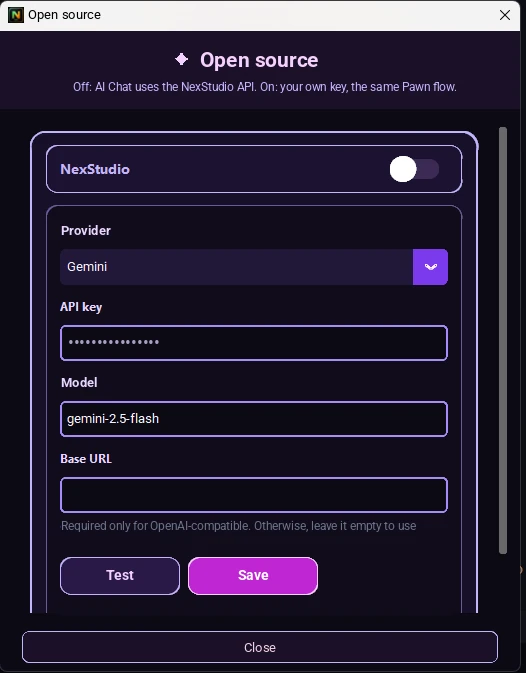
Open Source window: provider, API key, model and base URL.
🛠️ Improvements and fixes
- Corrected monitor in the .exe.
- Corrected icon in the .exe.
🎁 Benefits
- Free tokens tripled.
- Tokens reset every week.
Check the plans at la página de Precios.
⬇️ Download
Requirements: Windows 10 or 11 (64-bit recommended) and internet connection for AI Chat and updates.
- Official site: https://nexstudio-amxx.com/descargar.php
- GitHub (release v1.0.4): Release v1.0.4 en GitHub (file NexStudio-Setup.exe)
- GameBanana: https://gamebanana.com/scripts/13426
SHA256 from NexStudio-Setup.exe:
5725061AA91D2981669D2470FE8D9E66E0C0C5B12B00A4B10B993A53B68E8955Without installing anything? You can also try Chat IA en la web with your account.
💬 Tell us what you think!
Download 1.0.4, try the Monitor and the new IA Pawn Chat, and leave us your comments, questions or bug reports in this topic or in the forum Editor y compile. Thank you for continuing to build with us! 🙌
— NexStudio Administration
¡Hola, comunidad! 👋
Ya está disponible NexStudio AMXX 1.0.4, la nueva versión de nuestro IDE para crear plugins Pawn / AMX Mod X para Counter-Strike 1.6. Esta actualización trae tres novedades grandes: un Monitor CS 1.6 para probar tu plugin sin salir del IDE, un Chat IA Pawn renovado con varias conversaciones y el modo Código abierto para conectar tu propia API de IA.
Prueba, edita y genera sin salir del IDE.
🖥️ 1. Monitor CS 1.6
Prueba las funciones de tu .sma dentro del IDE y mira si funcionan.
- Prueba tu .sma directamente en NexStudio.
- Edita HUD y textos en vivo: cambia posición y color, y guárdalos de vuelta en el SMA.
- Vista previa de cómo se ven los menús y los mensajes de chat/center.
- Consola Test Pawn y más.
Monitor CS 1.6 con vista previa del HUD y consola Test Pawn.
Menú de armas y HUD con edición en vivo de posición y color.
🤖 2. Nuevo Chat IA Pawn
Adiós a "conversación cerrada": ahora tienes varias conversaciones guardadas.
- Si dices "créame" o pides algo nuevo, se abre un chat nuevo solo.
- Si dices "mejora" o "modifica", lo arregla en el mismo chat, sobre el mismo .sma.
Chat IA Pawn creando un HUD con la información del jugador en una conversación nueva.
Chat IA Pawn modificando el mismo .sma en la misma conversación.
🔓 3. Código abierto: trae tu propia IA
Conecta tu propia API de IA y úsala dentro de NexStudio: Gemini, ChatGPT (OpenAI) o cualquier API compatible con OpenAI. Tú eliges qué IA escribe y mejora tus plugins.
- Tu propia API key y tu modelo favorito.
- Configuras proveedor, API key, modelo y URL base (la URL base solo hace falta para APIs compatibles con OpenAI).
- El mismo flujo de Chat IA Pawn: crear, modificar y compilar.
- Con el modo apagado, el Chat IA usa la API de NexStudio. Puedes volver a ella cuando quieras.
Ventana de Código abierto: proveedor, API key, modelo y URL base.
🛠️ Mejoras y correcciones
- Monitor corregido en el .exe.
- Icono corregido en el .exe.
🎁 Beneficios
- Los tokens gratis se triplican.
- Los tokens se reinician cada semana.
Consulta los planes en la página de Precios.
⬇️ Descarga
Requisitos: Windows 10 u 11 (64 bits recomendado) y conexión a internet para el Chat IA y las actualizaciones.
- Sitio oficial: https://nexstudio-amxx.com/descargar.php
- GitHub (release v1.0.4): Release v1.0.4 en GitHub (archivo NexStudio-Setup.exe)
- GameBanana: https://gamebanana.com/scripts/13426
SHA256 de NexStudio-Setup.exe:
5725061AA91D2981669D2470FE8D9E66E0C0C5B12B00A4B10B993A53B68E8955¿Sin instalar nada? También puedes probar el Chat IA en la web con tu cuenta.
💬 ¡Cuéntanos qué te parece!
Descarga la 1.0.4, prueba el Monitor y el nuevo Chat IA Pawn, y déjanos tus comentarios, dudas o reportes de errores en este tema o en el foro Editor y compile. ¡Gracias por seguir construyendo con nosotros! 🙌
— Administración NexStudio
Automatically translated