January 2027 NexStudio Mapper Block-based maps · CS 1.6 · coming soon See more →
Next update · 1.0.5

In progress

Desktop IDE · Pawn / AMX Mod X

IDE to create AMXX plugins for Counter-Strike 1.6

The IDE for Counter-Strike 1.6 plugins

Create, edit and compile Pawn / AMX Mod X plugins. Generate code with AI, switch AMXX version, and deliver a ready .sma and .amxx.

Built for Counter-Strike 1.6 Generated with AI Not a game · It is an IDE

All code and assistance are generated with AI specialized in Pawn / AMXX.

Changelog

Updates

What's new in the IDE, AI chat and web. Slide the card to see each version.

v1.0.4

NexStudio AMXX · New version 1.0.4

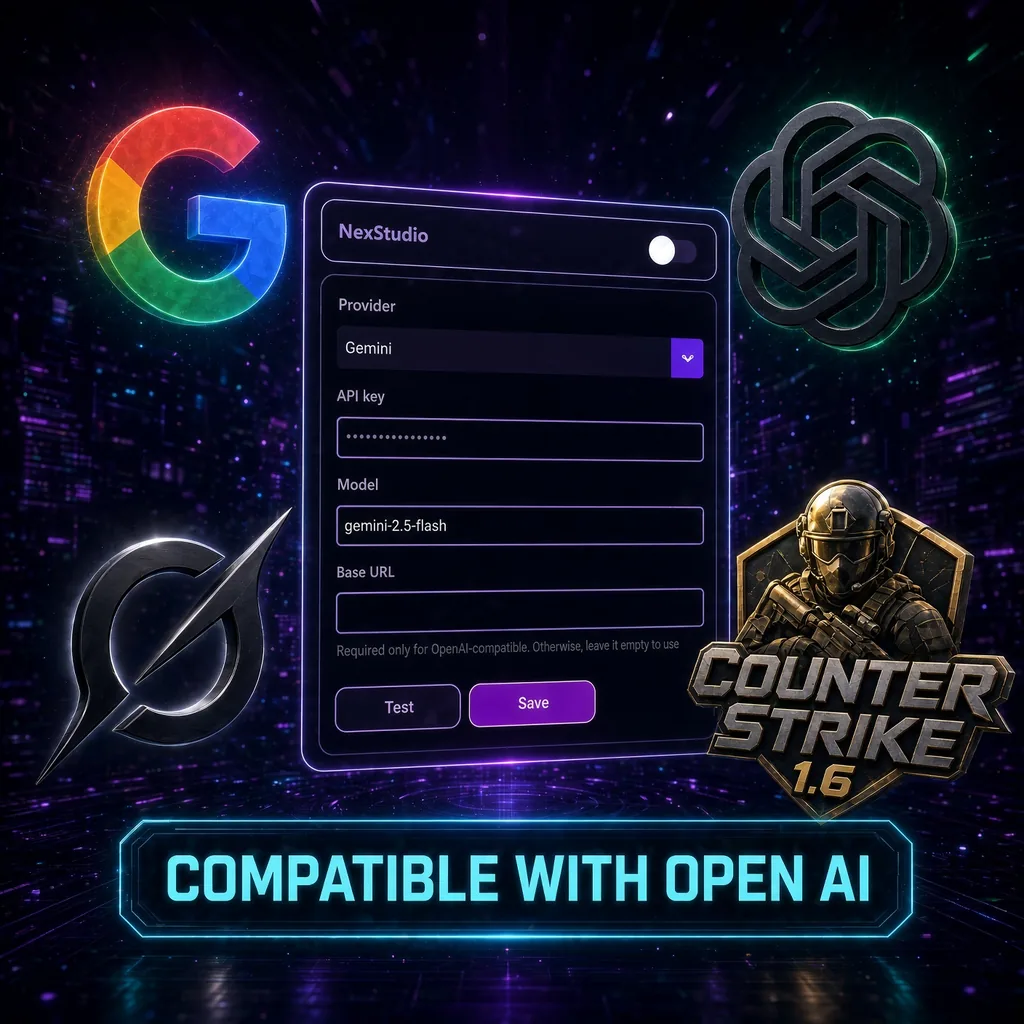
  • Open source mode: each user can use their own AI API (provider, API key, model and base URL). Off = uses the NexStudio API.
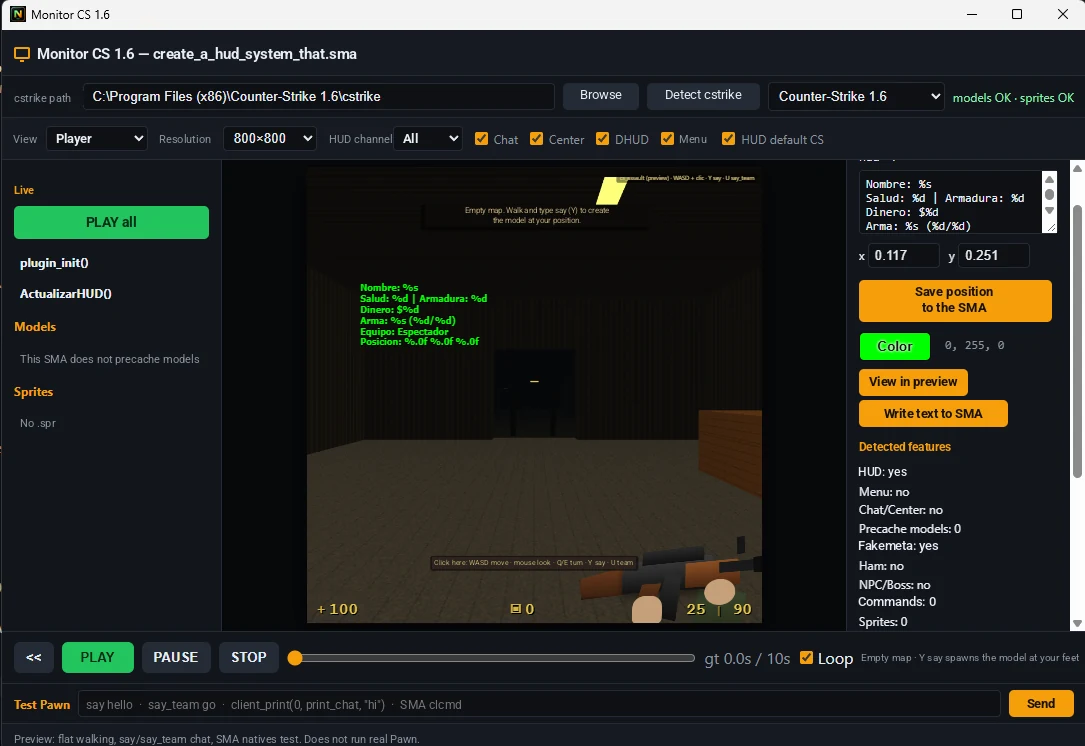
  • CS 1.6 Monitor: test your .sma functions right inside the IDE and see if they work.
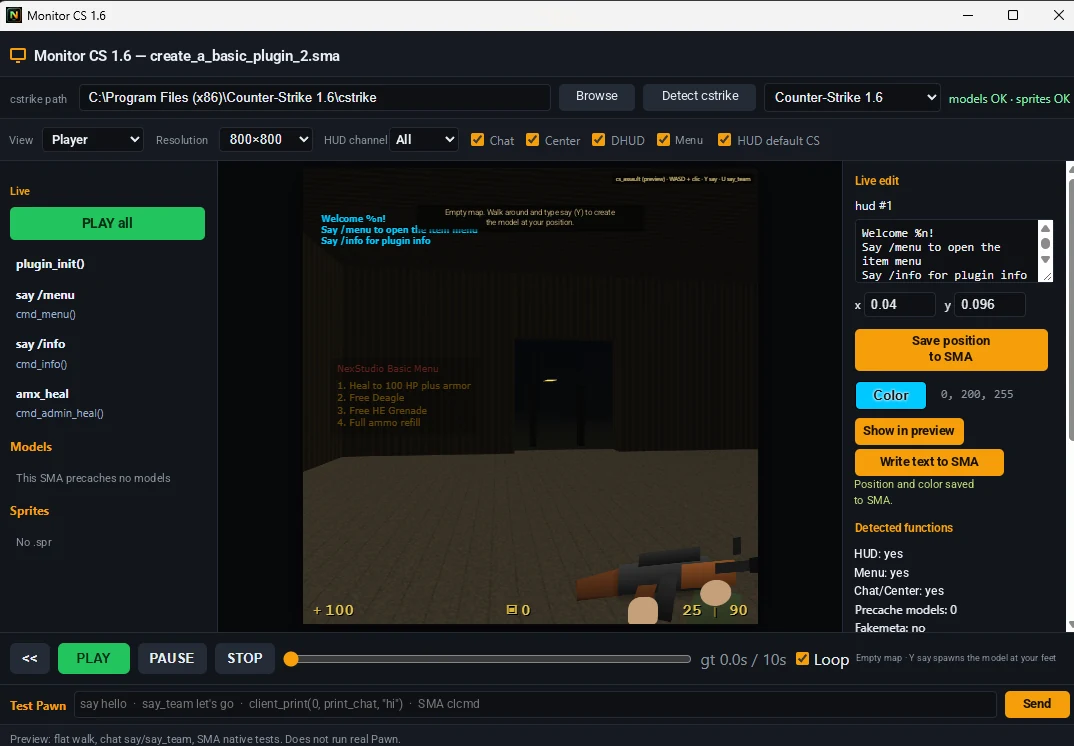
  • Edit HUDs and texts live: position and color, then save them back into the SMA.
  • Preview how menus and chat/center messages look; Test Pawn console and more.
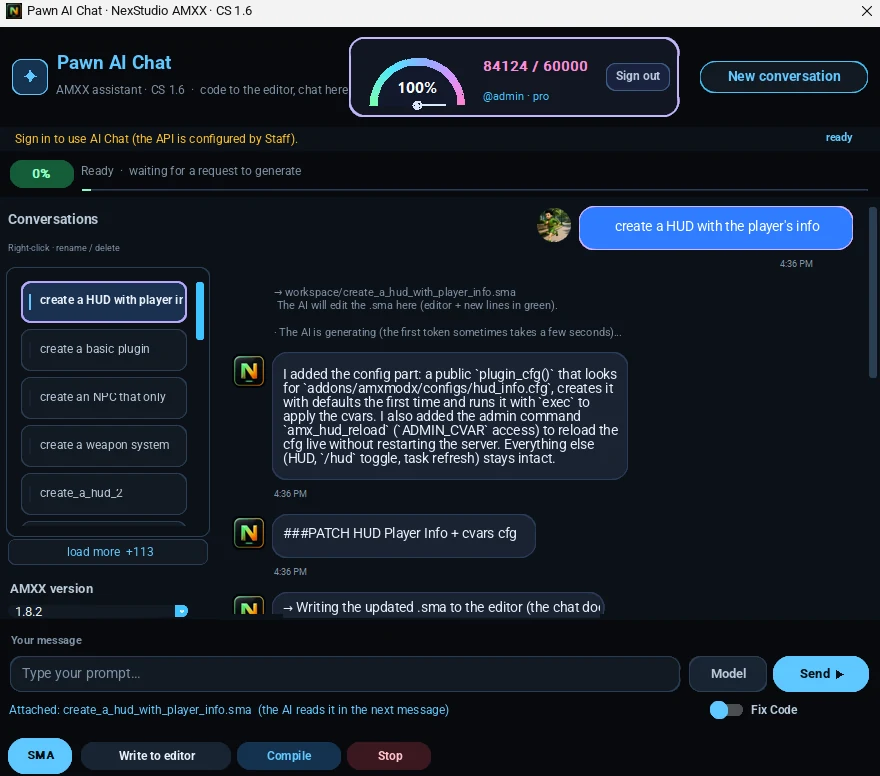
  • New Pawn AI Chat: "conversation closed" is gone and you now get multiple conversations.
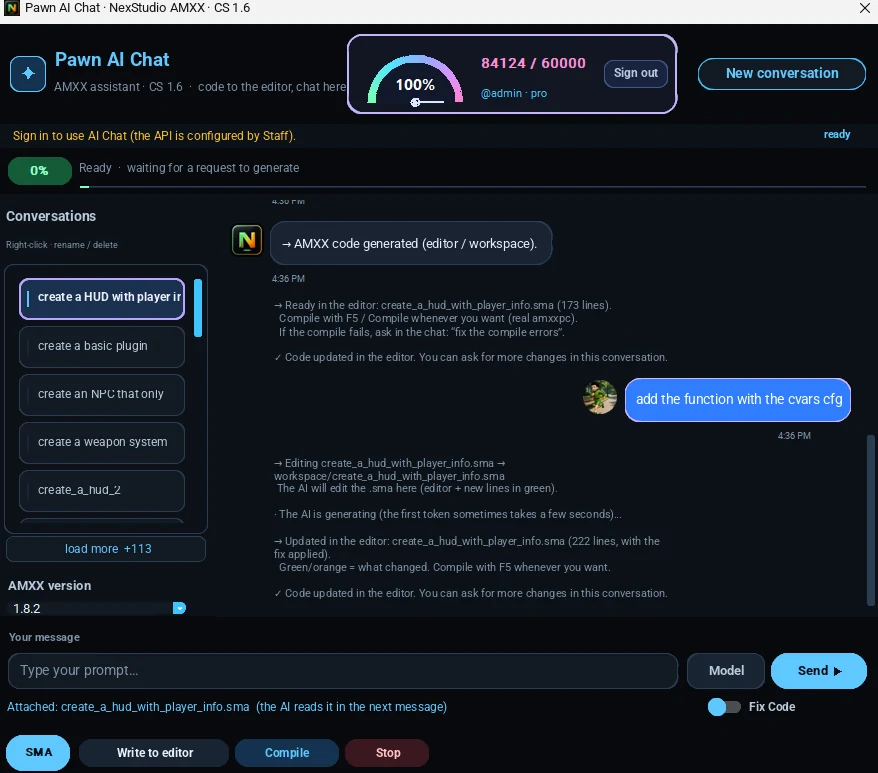
  • Say "create" or ask for something new and a new chat opens automatically; say "improve" or "modify" and it is fixed in the same chat.
  • Monitor and icon fixed in the .exe.

Benefits

  • Free tokens are tripled.
  • Tokens reset every week.

Read the forum thread →

v1.1.0

Chat Pawn mode + AI

  • Web AI chat: Pawn mode generates and edits .sma plugins (account required)
  • Tells you what it added and how to use it: commands, cvars and menus
  • Download the .sma when you want; closing the browser does not stop generation
  • Gold SMA button in Pawn mode to upload and improve your plugin
v1.0.2

NexStudio AMXX launch

  • NexStudio AMXX launched for Windows on September 10, 2026.
  • Desktop IDE for creating Pawn/AMX Mod X plugins for Counter-Strike 1.6.
  • Generate and edit .sma plugins with tools to work on, review, and organize code.
BenefitsFree tokens are tripled.Tokens reset every week.

NexStudio AMXX IDE

The software at a glance

Watch the full v1.0.4 tutorial: IDE, CS 1.6 Monitor, Pawn AI Chat and Open Source.

New in v1.0.4

Test, edit and generate without leaving the IDE

CS 1.6 Monitor to see your plugin in action, Pawn AI Chat with multiple conversations and Open source mode with your own AI API.

CS 1.6 Monitor

Test your .sma functions right inside the IDE and see if they work. Edit HUDs and texts (position, color) and save them back into the SMA. Preview menus and chat/center messages, plus a Test Pawn console.

NexStudio AMXX CS 1.6 Monitor with HUD preview and Test Pawn console
CS 1.6 Monitor showing a weapons menu and HUD with live position and color editing

New Pawn AI Chat

No more "conversation closed": now you have multiple conversations. Say "create" or ask for something new and a new chat opens; say "improve" or "modify" and it is fixed in the same chat.

Pawn AI Chat creating a player info HUD in a new conversation
Pawn AI Chat modifying the same .sma in the same conversation

Open source mode: bring your own AI

Plug your own AI API into NexStudio: Gemini, ChatGPT (OpenAI) or any OpenAI-compatible API. You choose which AI writes and improves your plugins.

  • Your own API key
  • Your favorite model
  • The same Pawn AI Chat flow: create, modify and compile
  • Switch back to NexStudio AI anytime
OpenAI-compatible: use Gemini, ChatGPT or any compatible API in NexStudio AMXX

Also: monitor and icon fixed in the .exe.

NexStudio AMXX IDE

IDE features

The tools you see in the screenshots: CS 1.6 Monitor, Pawn AI Chat with multiple conversations, Open source mode, explorer, compile and AMXX version.

CS 1.6 Monitor

Test your .sma functions inside the IDE: HUD, menus, chat and center messages, plus a Test Pawn console.

Open source mode

Bring your own AI: Gemini, ChatGPT (OpenAI) or any OpenAI-compatible API.

Multiple conversations

"Create" opens a new chat; "improve" or "modify" fixes the plugin in the same chat.

Explorer

Project tree: include, modules and .sma scripts in one panel.

Search

Find natives, functions and text inside your plugins.

Source control

Track code changes without leaving NexStudio.

Compile

One click to .amxx. Compile OK, warnings and errors at the bottom.

Pawn AI Chat

Ask in plain language and get Pawn for CS 1.6 beside your code.

Pawn highlighting

AMXX syntax: includes, publics, strings and comments.

Tabs

Several .sma files open: plugin, utils and config at once.

AMXX version

Pick 1.8.2, 1.10 or another to match the target server.

Plans in the IDE

Free, Premium, Pro and Programmer visible in the app. Activate without fuss.

Extensions

Extend the IDE with extra tools for AMXX scripters.

Settings

Theme, editor and workspace preferences.

Ready status

Bottom bar with compile, line/column, UTF-8 and time.

What NexStudio is

NexStudio AMXX is a desktop IDE for scripters, server admins and mod creators. It is not a game. It is not a server. It is the tool to build mods, plugins, menus, bosses, modes and systems for CS 1.6.

Which game it is for

It is built for Counter-Strike 1.6 and the AMX Mod X ecosystem. If you run a server or write Pawn plugins, this is your workspace.

What it generates

.sma files — Pawn / AMXX source ready to edit.
.amxx files — compiled plugin, ready for the server.
Plugin templates, menus, bosses and systems.
Code fixes and plugins created with Pawn AI Chat.

How it works

1

1. Write or generate

Open the editor, use a template, or describe the plugin in Pawn AI Chat.

2

2. Compile

Pick the AMXX version and compile. If it fails, AI helps you fix it.

3

3. Ship

Export the .sma and .amxx. Upload them to your server.

Pawn AI Chat

Describe the plugin in Spanish or English: admin menu, XP system, boss, game mode. The AI writes Pawn aimed at AMXX, not generic code.

All code and assistance are generated with AI specialized in Pawn / AMXX.

Pawn AI Chat creating a HUD plugin in NexStudio AMXX

New

You can register your server now

List your CS 1.6 server live: players, map and connect.

Counter-Strike 1.6 ONLINE

Straightforward plans

Start free. Move to Premium, Pro or Programmer + Owners + Server when you need more AI, more projects and tools for active scripters.

Free

$0

Basic editor · Limited AI Chat

Premium

$10 USD/ month

Limited Pawn AI Chat · Switch AMXX version

Credits

NexStudio AMXX is an independent product built for the CS 1.6 scripting community.

Powered by DanielFriend5295 and ItachiCrossMxL

Open forum